How to Watch VR Porn on Samsung Gear VR
Can Samsung Gear VR still play VR porn?
Yes, Samsung Gear VR can still play VR porn if you have a compatible Samsung phone and the right Oculus-era apps already set up. You can either stream through a browser or open downloaded files in a VR video app. For proper depth, make sure the video is set to the correct projection such as 180° or 360° and the correct stereo mode, usually SBS, otherwise the image can look flat or distorted.
Why Gear VR Is Different from Other Mobile VR Headsets
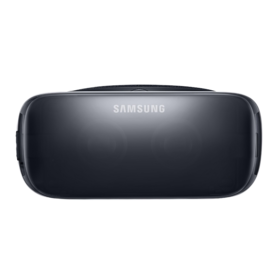
Samsung Gear VR sits somewhere between simple phone viewers and more advanced standalone VR headsets. It was built to work with selected Samsung Galaxy phones and a dedicated Oculus software layer, which made it more polished than basic cardboard viewers. Even though it is now older hardware, it can still handle immersive video surprisingly well if you stay within the limits of the phone and use the right playback settings.
What You Need
- Samsung Gear VR headset
- A compatible Samsung Galaxy phone
- An Oculus account or previously configured Gear VR setup
- Wi-Fi for streaming or storage space for local files
- Optional: headphones for better audio immersion
Which Videos Work Best on Samsung Gear VR?
Gear VR works best when the file format matches the headset’s mobile hardware limits. If the bitrate is too high or the wrong display mode is selected, playback can quickly become uncomfortable.
- 180° stereoscopic: usually the best balance of depth, sharpness, and smooth playback
- 360° VR: supported, but older phones can struggle with larger files
- SBS / side-by-side: one of the most common stereo layouts for proper 3D playback
- Mobile-friendly files: lower-bitrate files often run better than huge high-resolution downloads
How to Stream VR Porn on Samsung Gear VR
Streaming is the easiest option if you want to start immediately and do not want to manage files.
- Dock your compatible Samsung phone into the Gear VR headset.
- Open the browser or supported playback app on the device.
- Visit the VR video page you want to watch.
- Start playback and switch to immersive or fullscreen mode if available.
- Check that the video is using the correct 180°, 360°, and SBS settings before continuing.
How to Watch Downloaded VR Videos on Gear VR
Local playback is often the better option on Samsung Gear VR because it reduces buffering and puts less strain on the connection.
- Download the VR video file to your Samsung phone.
- Open a VR playback app that supports local files.
- Select the downloaded video from storage.
- Choose the correct projection mode, such as 180° or 360°.
- Enable SBS or the correct stereo mode if the image does not look three-dimensional.
- Insert the phone into Gear VR and begin playback.
Why Downloading Often Works Better on Gear VR
Because Gear VR depends on an older smartphone platform, downloads are often smoother than streams. They reduce network-related stutter, make playback more predictable, and usually help with heat management if you avoid extremely heavy files.
Common Problems on Samsung Gear VR
- Video looks flat: the stereo mode is wrong, so switch to SBS or the correct 3D setting
- Scene looks stretched or warped: the projection is wrong, so check whether the file is 180° or 360°
- Phone gets too hot: close background apps, lower playback quality, and keep sessions shorter
- Playback keeps stuttering: use a downloaded file instead of streaming and avoid very large files
- Image looks soft: increase brightness, clean the lenses, and reposition the headset for better alignment
Tips for Better Gear VR Viewing
- Charge the phone fully before longer sessions
- Start with 180° videos rather than 360° for a sharper-looking result
- Use headphones to improve immersion and reduce outside noise
- Keep the phone cool by closing unused apps before playback
- Do not expect the same clarity as modern standalone headsets
Related Guides
- How to Watch VR Porn on Any Headset
- How to Watch VR Porn on Oculus Go
- How to Watch VR Porn on a Smartphone
Final Thoughts
Samsung Gear VR is clearly older technology now, but it can still handle immersive adult video if you already own compatible hardware and keep your expectations realistic. The best results usually come from 180° SBS videos, downloaded playback, and careful phone setup. It is no longer the easiest or most powerful way to watch VR porn, but it can still work as a simple legacy option.