How to Watch VR Porn on Meta Quest 3S
To watch VR porn on Meta Quest 3S, open a VR video in the headset browser or in a compatible VR player, then select the correct projection mode such as 180° or 360° and enable stereoscopic playback when required. Streaming is the easiest way to start, while downloaded files usually provide better quality and smoother playback.
This guide explains how to stream VR porn on Meta Quest 3S, how to play downloaded files, which formats work best, which players to use, when Meta Link or Air Link can help, and how to fix common issues such as flat 2D playback, blurry image quality, warped perspective, or buffering.
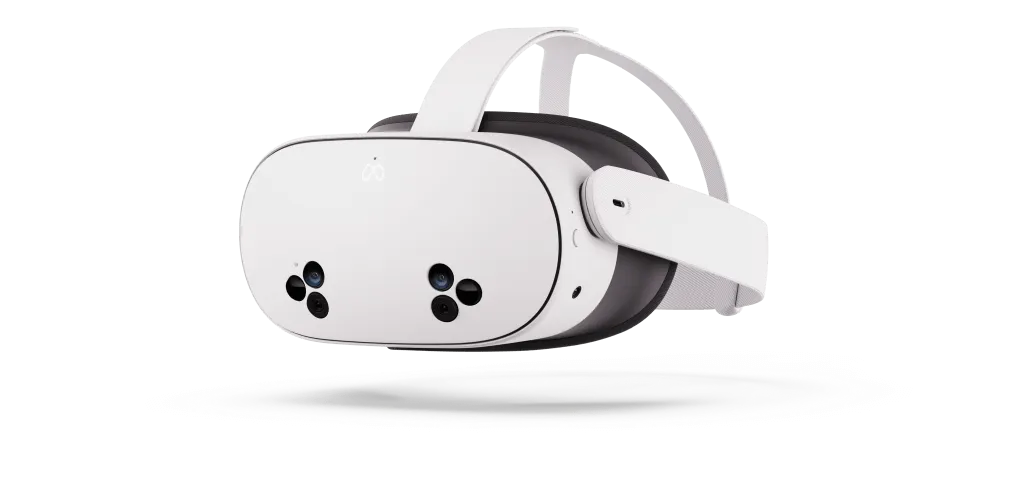
How do you watch VR porn on Meta Quest 3S?
You can watch VR porn on Meta Quest 3S by streaming through the built-in browser or by opening downloaded files in a VR video player. To get proper depth and immersion, you need to match the video format correctly by selecting the right projection mode and stereo setting.
What You Need
- Meta Quest 3S headset
- Stable Wi-Fi for streaming
- Meta account and initial headset setup completed
- Optional PC or Mac for transferring files
- Optional VR video player app for more playback controls
How to Watch VR Porn on Meta Quest 3S Step by Step
- Open the Meta Quest browser or a compatible VR video player.
- Load a VR video by streaming it or opening a downloaded file.
- Select the correct projection mode, usually 180° or 360°.
- Enable the proper stereo or 3D mode, often side-by-side (SBS), if the video looks flat.
- Use the highest stable resolution your connection or file can support smoothly.
Why Meta Quest 3S Is Good for VR Video
Meta Quest 3S is an affordable standalone headset that gives you access to the same core Meta ecosystem as Quest 3, including strong browser support, app compatibility, and easy setup. While its display is not as sharp as Quest 3, it still handles modern immersive video well and offers smooth playback for both streaming and downloaded files.
Meta Quest 3S vs Meta Quest 3
The biggest difference is display sharpness. Meta Quest 3 gives you better clarity, while Meta Quest 3S focuses on value and accessibility. Both headsets support the same general playback methods, so if you want the flagship experience you can compare this page with our Meta Quest 3 guide.
Best VR Video Formats for Meta Quest 3S
Meta Quest 3S plays immersive video well, but your results depend on choosing the correct format and playback settings. If the wrong projection or stereo mode is selected, the image can look flat, stretched, or warped.
180° Stereoscopic VR
180° stereoscopic VR is usually the best format for Meta Quest 3S because it offers strong immersion, more natural scale, and better sharpness in the main viewing area. For most users, it provides the best balance of realism and comfort.
360° VR
360° VR provides full environmental immersion, but it generally needs more bitrate and higher resolution to stay sharp. If 360° content looks soft or buffers too much while streaming, downloaded playback often gives a better result.
Supported Stereo and Codec Formats
- Stereo mode: many videos require SBS (side-by-side) for true 3D depth
- Projection: 180° and 360° formats are commonly supported
- Codecs: commonly H.264 and H.265 (HEVC)
Best Ways to Watch VR Porn on Meta Quest 3S
| Method | Best For | Quality | Ease of Use |
|---|---|---|---|
| Browser Streaming | Fastest setup | Medium to High | Easy |
| Downloaded File Playback | Best image quality | High | Medium |
| Meta Link / Air Link | PC playback and large libraries | High | Medium |
How to Stream VR Porn on Meta Quest 3S
Streaming is the fastest way to start watching and works best when you have reliable Wi-Fi.
- Open the Meta Quest Browser inside your headset.
- Visit the VR video page you want to watch.
- Press play and switch to VR or fullscreen mode if available.
- Select the correct projection mode, such as 180° or 360°.
- If the video looks flat, enable stereoscopic or SBS playback.
You can try your setup with our most-watched VR porn videos.
Streaming Tips
- Buffering: lower the resolution, improve Wi-Fi signal, or switch to downloaded playback.
- Wrong perspective: check the projection mode first.
- Flat image: make sure the player is using the correct stereo or SBS setting.
- Soft image: streaming may be falling back to a lower-quality version.
How to Download and Watch VR Porn on Meta Quest 3S
Downloading is usually the best option for high-resolution VR video because it avoids buffering and preserves more image detail.
- Download the VR video file to your computer or another accessible storage location.
- Connect Quest 3S to your computer and copy the file to the headset.
- Open a compatible VR video player.
- Select the file and set the correct projection mode, such as 180° or 360°.
- Enable stereoscopic or SBS mode if required for proper 3D playback.
If you want to test longer scenes, you can try this popular feature-length release.
Recommended VR Video Players for Meta Quest 3S
- DeoVR
- Skybox VR
- Meta’s built-in media or gallery player for basic support
Is Streaming or Downloading Better on Meta Quest 3S?
Streaming is better for speed and convenience when you want to start watching immediately. Downloading is usually better for image quality because it avoids buffering, keeps bitrate more consistent, and handles larger VR files more smoothly.
Can You Connect Meta Quest 3S to a PC for VR Video?
Yes, Meta Quest 3S supports Meta Link and Air Link, which can be useful for PC-based playback, very large local libraries, and more advanced player controls. If you have a powerful PC, this can give you more flexibility for high-bitrate files.
Recommended Meta Quest 3S Playback Settings
- Projection mode: match the video format exactly, such as 180° or 360°.
- Stereo / 3D mode: enable stereoscopic playback when required, often SBS.
- Brightness: raise slightly if darker scenes look too dim.
- Audio: use headphones for stronger immersion.
- Lens clarity: keep lenses clean and the headset properly seated.
- Quality: use downloads when you want the sharpest possible image.
Common Problems and Fixes
- Video looks flat: enable stereoscopic or SBS mode and confirm the correct projection mode.
- Video looks blurry: re-seat the headset, clean the lenses, check fit, and raise the resolution if available.
- Video buffers: lower streaming quality or switch to local playback.
- Video looks warped: the wrong projection mode is selected.
Browse VR Porn for Meta Quest 3S
You can test your setup by browsing new VR porn videos, exploring VR porn studios, or returning to our main how to watch VR porn guide for broader headset support.
Related Guides
- How to Watch VR Porn on Any Headset
- How to Watch VR Porn on Meta Quest 3
- How to Watch VR Porn on Smartphone
Frequently Asked Questions
How do you watch VR porn on Meta Quest 3S?
You can watch VR porn on Meta Quest 3S by streaming in the headset browser or by playing downloaded files in a VR video player. Select the correct projection mode and enable stereoscopic playback when needed.
Is streaming or downloading better on Meta Quest 3S?
Downloading is usually better for high-resolution files because it avoids buffering and keeps image quality more stable. Streaming is more convenient when your Wi-Fi is strong and you want faster access.
Why does a VR video look flat on Meta Quest 3S?
A VR video usually looks flat when the wrong stereo setting is selected. Switching to stereoscopic or SBS mode usually fixes the problem.
What VR format works best on Meta Quest 3S?
180° stereoscopic VR usually works best because it delivers strong immersion, more natural scale, and better sharpness in the main viewing area.
Can Meta Quest 3S play 360° VR videos?
Yes, Meta Quest 3S can play 360° VR videos, but they usually need more bitrate and resolution to look sharp compared with 180° content.
Which VR video players work best on Meta Quest 3S?
DeoVR, Skybox VR, and Meta’s built-in media player are common options for immersive playback on Quest devices.
Why is VR porn blurry on Meta Quest 3S?
Blurry playback can be caused by low streaming quality, poor headset fit, dirty lenses, or incorrect settings. Downloaded files often provide the sharpest result.
Can you use Meta Quest 3S with a PC for VR video playback?
Yes, Meta Quest 3S can be connected to a PC with Meta Link or Air Link for more advanced playback options and access to larger local video libraries.