VR Porn Videos – How to Watch the Best Adult Scenes on PICO 4 Ultra
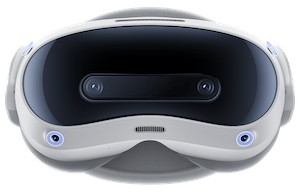
The PICO 4 Ultra has quickly become a favourite among people who want a light, comfortable headset that still delivers razor-sharp images and smooth motion for immersive entertainment. Rather than focusing only on games, this model really shines when you are watching panoramic 180° and 360° experiences, where clarity, comfort, and long-session usability matter most. For fans of PICO 4 Ultra VR Porn and other cinematic content, it offers a very convincing blend of performance and ease of use.
Its pancake lenses reduce distortion and keep details crisp from the centre of the image all the way to the edges. Combined with a wide field of view and strong colour reproduction, the Ultra makes everything from subtle facial expressions to distant background details look more lifelike. Under the shell, a powerful chipset keeps high-resolution files playing smoothly, especially when paired with a good player and a stable connection.
How PICO 4 Ultra Compares to Other Headsets
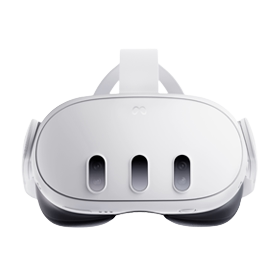
In the standalone space, the Ultra sits alongside other popular headsets rather than trying to imitate them. Many users who have tried both this device and Meta’s latest models note that the Ultra feels particularly strong on comfort and edge-to-edge clarity. If you are already familiar with Meta’s ecosystem, you can see how it stacks up by comparing it with guides such as our Meta Quest 3 setup walkthrough and the more premium-focused Meta Quest Pro viewing guide.
Where some devices prioritise advanced mixed-reality tricks or console-style interfaces, the Ultra leans into being an extremely capable all-rounder for long-form viewing. For many people, it hits the sweet spot between price, image quality, and comfort.
Unboxing and First-Time Setup
Getting started is straightforward, even if you have never used a headset before:
- Charge the device fully before your first session.
- Power it on and follow the on-screen instructions to choose language and region.
- Connect to Wi-Fi and sign in or create a PICO account.
- Set up your boundary so the headset understands your safe viewing area.
- Use the digital interpupillary distance adjustment to line the lenses up with your eyes.
That last step is easy to rush, but it makes a big difference. When IPD is dialled in correctly, text becomes sharper, details pop, and eye strain is reduced during longer sessions.
Comfort, Controllers and Hand Tracking
One of the strongest aspects of the PICO 4 Ultra is how comfortable it feels, even when you’re watching extended scenes. The balanced strap reduces front-heavy pressure, and the cushioning sits securely without digging in.
The controllers themselves are compact and responsive. They are ideal for quick navigation, seeking, and interface control. If you prefer an even more minimal setup, the Ultra’s hand-tracking capabilities mean you can browse menus, start or pause scenes, and adjust playback using just your hands. For users who primarily watch panoramic films or intimate close-up content, this hands-only navigation becomes surprisingly addictive.
Watching Immersive Videos on PICO 4 Ultra
You have two main viewing paths on this headset: streaming directly from websites or playing downloaded files through a dedicated media player. Both work well, and the best option depends on your connection speed and how important maximum sharpness is to you.
Streaming for Quick Access
Streaming is perfect when you want to jump into something immediately. Open the device’s built-in browser, visit your preferred platform, choose a scene, and switch to fullscreen. As long as your internet connection is solid, the Ultra will keep playback smooth and responsive, even with large files.
If you want inspiration on what to watch, you can explore our most-watched immersive scenes, which are sorted by popularity and engagement.
Downloading for Maximum Quality
When you want the clearest possible image and the least risk of stuttering, downloading your scenes is the better choice. Transfer files to the headset via cable or Wi-Fi file transfer, then open them using a dedicated media player such as Skybox or the PICO video app. These players recognise common 180° and 360° formats and give you control over projection, zoom, and viewing distance.
For a great example of how well the Ultra handles close-up cinematic detail, try something atmospheric or visually rich, such as this fan-favourite feature.
PC Connection for Power Users
If you have a capable computer, you can connect the PICO 4 Ultra to a PC over cable or high-bandwidth Wi-Fi. This unlocks more advanced desktop players, higher bitrates, and extra control over decoding and colour. It’s a good option for people with large local libraries or for those who want to squeeze every last drop of visual quality from their headset.
Tips for the Best Image and Sound
- Clean the lenses regularly with a soft, dry cloth to avoid haze.
- Increase brightness slightly for better contrast, especially in darker scenes.
- Use over-ear or in-ear headphones for richer positional sound.
- Sit or recline comfortably to keep your neck relaxed during longer sessions.
- Whenever possible, choose higher-resolution downloads rather than low-bitrate streams.
If you like to switch between mobile and headset viewing, you can also follow our iPhone and Android viewing guide to keep everything consistent across devices. This is helpful if you browse on your phone and then send favourites to your headset later.
Exploring Studios, Categories, and Long-Form Content
The strengths of the PICO 4 Ultra really show when you’re watching carefully produced scenes from established producers. If you’re curious which creators focus on high-budget sets, realistic depth, and strong camera work, you can browse our overview of the top studios that consistently deliver premium immersive experiences.
From there, it’s easy to build watchlists that play to the Ultra’s strengths: detailed close-ups, smooth camera motion, and rich environments with plenty of depth. The more you explore, the more you’ll notice just how well this headset renders subtle features and fine textures.
Why PICO 4 Ultra Works So Well for Immersive Adult Content
For people exploring PICO 4 Ultra VR Porn, the key advantages are clarity, comfort, and stability. The headset is light enough for extended use, the lenses keep the whole scene sharp, and the hardware has enough power to handle high-resolution files without constant tweaking.
In practice, this means you can put the headset on, select something from a curated list of popular scenes or from a favourite studio, and simply watch without constantly thinking about performance or image issues. It’s this “it just works” quality that makes PICO 4 Ultra virtual reality porn viewing so appealing compared to older, more fiddly setups.
Whether you’re building playlists from the most-viewed scenes, following particular studios, or exploring new categories, the Ultra feels like it was built for long, uninterrupted sessions of high-definition adult entertainment. For anyone who wants a modern, comfortable headset that emphasises sharpness and ease of use, PICO 4 Ultra adult headset content is hard to beat.