Pirou VR Porn Logo: Virtual Reality Sex Videos | PirouVR.com

VR Porn Videos – How to Watch the Best Adult Scenes on Valve Index

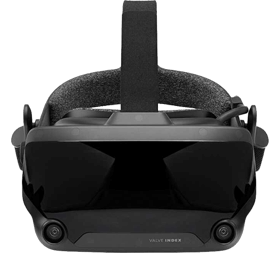
The Valve Index remains one of the most respected PC-based headsets in the world of immersive entertainment. Known for its exceptional comfort, ultra-smooth refresh rate, and the iconic “knuckle” controllers that track each finger individually, this headset offers a unique level of responsiveness during playback and navigation. For fans of high-resolution panoramic scenes, the Index continues to be a powerful, flexible option that takes advantage of your PC’s full graphical capabilities.

Unlike standalone devices that rely on mobile chipsets, the Index taps directly into your gaming computer’s GPU, making it capable of handling extremely high-bitrate files and detailed 180° or 360° environments with ease. Whether you're watching long cinematic releases or crisp POV sequences, this headset delivers smooth motion and consistent clarity across a wide field of view.

What Makes the Valve Index Stand Out?

Several features set the Index apart from other PC-powered systems:

  • High Refresh Rate: Supporting up to 144Hz, motion appears fluid and natural.
  • Excellent Optics: Clear lenses and a wide field of view enhance spatial depth.
  • Precision Tracking: SteamVR base stations ensure accurate positional tracking.
  • Knuckle Controllers: Individual finger tracking makes menu navigation extremely intuitive.

These strengths make the Index especially enjoyable for immersive playback, where stability and clarity have a major impact on overall presence.

How Valve Index Compares with Other Headsets

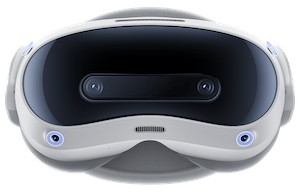
Compared to standalone devices—such as the Meta Quest 3S the Index relies entirely on PC power. This allows it to maintain higher frame rates and bitrates, making it ideal for viewers who prioritise ultimate smoothness and visual integrity.

If you enjoy switching between PC-based and mobile viewing, you can also consult our Smartphone Playback Guide for iPhone and Android setups.

Setting Up the Valve Index for the First Time

Before you start watching panoramic content, you’ll need to set up the Index properly:

  • Install SteamVR and ensure your PC meets recommended GPU requirements.
  • Place your base stations in opposite corners for accurate room tracking.
  • Connect the headset and verify that audio, display, and sensors are functioning.
  • Run through SteamVR’s setup to define your room-scale or seated environment.
  • Adjust the head strap and lens distance for maximum clarity.

A few extra minutes adjusting IPD and facial interface padding can significantly improve sharpness and comfort, especially during longer sessions.

How to Watch Immersive Videos on Valve Index

Once everything is set up, you can choose between streaming or downloading your content.

Streaming Inside SteamVR

Many users prefer streaming for convenience. Launch a VR-compatible browser inside SteamVR, navigate to your platform of choice, and start playback in immersive mode. A fast connection will help ensure smooth streaming, especially for 5K and 6K releases.

To explore scenes that consistently perform well across all devices, visit our Best VR Porn Scenes sorted by popularity.

Playing Downloaded Scenes

If you want the sharpest possible imagery, downloading your files is the way to go. PC-based headsets like the Index thrive with high-bitrate local playback, especially when using a robust media player such as:

  • DeoVR
  • Whirligig
  • Skybox VR Player

Simply place your files on your PC, open your preferred player inside SteamVR, and select the appropriate projection format (typically 180° or 360° side-by-side).

If you’re interested in highly cinematic releases that showcase what the Index can do, try feature-rich productions such as our long-form visual standout, Molly Little Likes Big Cock In The Shower Remastered.

Optimising Playback Performance

The Index’s exceptional refresh rate means you should aim for consistently smooth playback. Here are key tips:

  • Use a strong GPU (RTX 2070 or higher recommended).
  • Close background programs before launching SteamVR.
  • Enable motion smoothing only if necessary.
  • Adjust brightness and gamma based on the scene’s lighting.
  • Use quality audio devices — the Index’s speakers are excellent, but headphones can reveal even more detail.

Comfort and Controller Benefits

The knuckle controllers are one of the most distinctive elements of the Valve Index. They allow natural finger-level interaction, making navigation feel almost instinctive. Adjusting playback, scrubbing through a timeline, or interacting with menus becomes effortless.

The headset itself features balanced weight distribution and comfortable padding, ideal for longer panoramic films or episodic releases. A slight tilt of the lenses can dramatically sharpen the image, so experiment until your preferred “sweet spot” aligns perfectly.

Discover More Studios and Performer-Focused Content

High-resolution headsets like the Index shine brightest when the content is produced by established creators with strong lighting and premium gear. To explore top-quality productions, browse our Best VR Studios section.

If you prefer following specific performers whose detail and expressiveness translate well in high-resolution formats, check out profiles such as Lexi Luna, whose scenes often feature careful framing and vivid production design.

Why Valve Index Is Excellent for Immersive Adult Viewing

With its wide field of view, high refresh rate, and precise finger-tracking controllers, the Valve Index offers a depth and immediacy that other headsets struggle to match. It handles large files gracefully, supports a wide range of player apps, and benefits directly from PC-grade hardware.

Whether you’re diving into vibrant close-up features, exploring atmospheric story-driven scenes, or browsing popular categories, the Index provides a consistently polished experience. Its blend of comfort, power, and fluid motion makes it a favourite among PC enthusiasts who value visual fidelity above all else.

For anyone seeking an advanced PC-tethered headset that delivers smooth, uninterrupted panoramic experiences, the Valve Index adult viewing setup remains one of the most complete solutions available.